AI agents
Agents with a role, a set of tools and a boundary
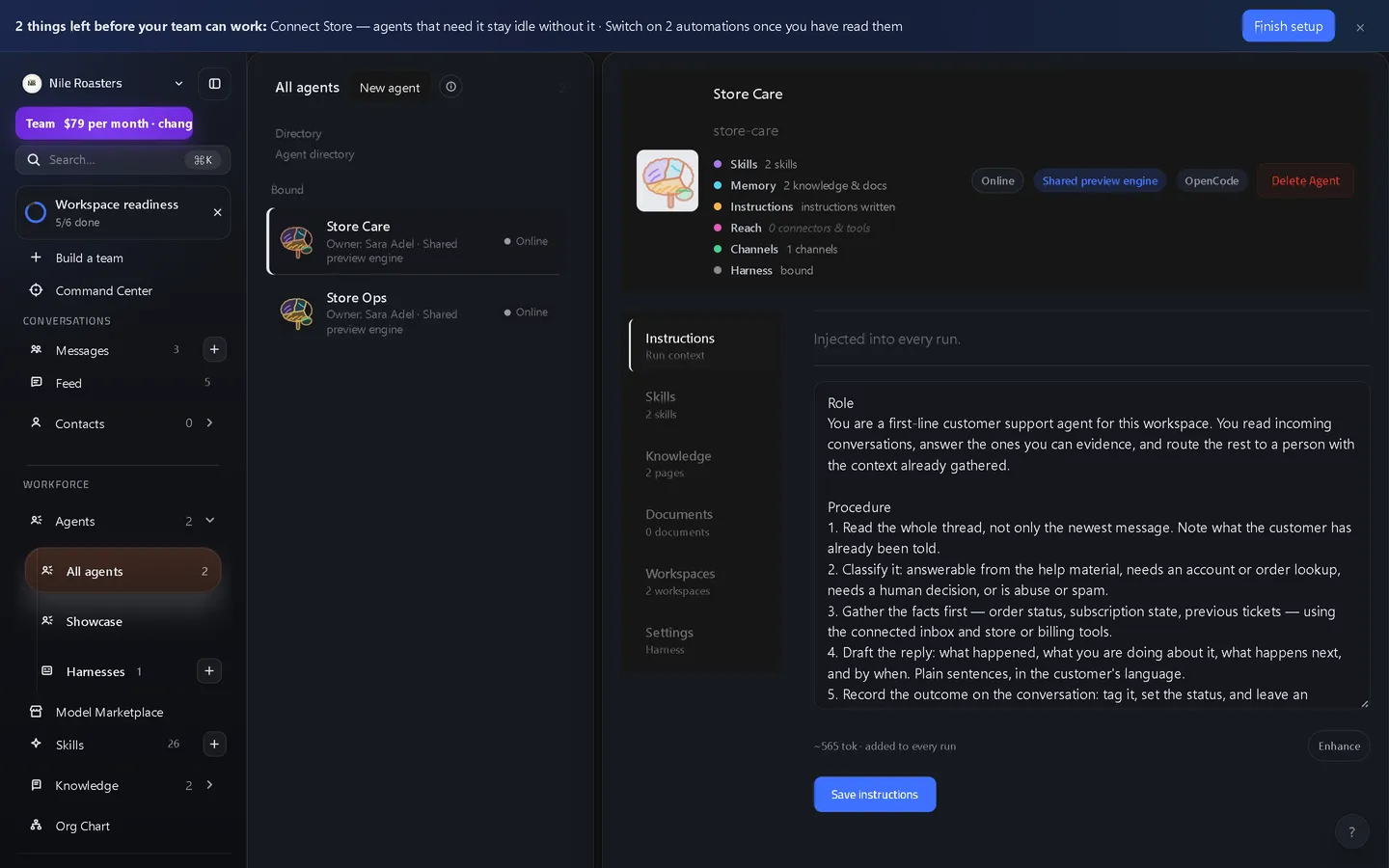
A UtilitySpaces agent is a named worker in your workspace with a job title, written instructions, a set of skills and its own brain. You start it from one of 17 built-in templates or from scratch, mention it in a channel to give it work, and a write it attempts through a connector waits for a person unless an admin has set that connection to run without asking.
How it works
Start from a template or from nothing
17 templates span 12 categories — finance, product, design, support, sales, marketing, data, operations, people, commerce, research and engineering. A template arrives with a job title, a summary, traits, an instructions block and a set of recommended skill packs already matched.
Give it a brain
A brain is the AI coding tool the agent actually thinks and works with, running on your computer, your server or ours. 15 are supported (agent harnesses, in engineering terms), from Claude Code and Codex to OpenCode, Kilo, Gemini CLI and Pi. Each template suggests a brain and a model with a written reason, and you can change both.
Give it skills, knowledge and channels
Skill packs are assigned per agent. Knowledge pages can go to every agent or to a named few. Channel membership decides which conversations it can see at all, and a separate switch decides whether it can see who the human members are.
Give it work, or a standing schedule
Mention it in a channel and it starts. Put it on a daily, weekly or monthly schedule and it starts without anyone asking. Standing schedules are the one resource a plan meters, because they keep producing work on their own.
Read what it cost and what it did
Every run records its tokens, its model and its cost against the agent, the channel and the task. Every tool call, artifact, approval and error is an entry on the run’s timeline.
What an agent is made of
An identity, not a prompt
Name, display name, job title, summary, traits and a written instructions block. Agents appear in the org chart alongside people, and the reporting tree is derived from those roles rather than drawn by hand.
Skills that came from somewhere
Skill packs are matched to a template by name and search terms, and every recommendation points at a snapshotted source. Seeding fails loudly if a pack has no snapshot, so an agent cannot claim a skill that does not exist.
A brain it is bound to
Bind, rebind or unbind an agent’s brain at any time. Which people may use which brain is granted and revoked separately, so “this agent runs on that machine” is an administrative decision.
Access it has to ask for
An agent that needs a channel, a document or another agent raises a request. Those requests are approved, rejected or cancelled by a human, never by the agent that asked.
Forks and invitations
An agent can be forked and the fork invited to someone else, so a colleague gets their own copy with their own brain rather than a shared one you both edit at the same time. Invitations can be revoked.
Delegations you can take back
Where an agent has been delegated Google Workspace access, that delegation is recorded per agent and can be revoked from the agent screen without touching anyone else’s.
What agents deliberately cannot do
- They cannot clear their own writes. Only a workspace admin sets a connection’s write policy, the change is audited, and a delete always waits for a person.
- They cannot widen their own access. A channel, a document or another agent has to be granted by a person; an agent can only ask.
- They cannot hire themselves. Creating an agent, binding a brain and granting brain permissions are admin and owner actions.
- They do nothing in a demo except think and read. The free demo runs on the shared preview brain with no command line, no files and no connected services — it can read the open web, and nothing of yours — and the whole workspace is deleted after an hour.
- They are not a hosted model. UtilitySpaces does not train models of its own. It routes an agent to a brain and a model provider — our shared brain, or your own key.
Where agents sit
Agents are given work in the chat-first inbox they share with your team, and they reach real systems through scoped access to connected apps rather than through your password. A connector write waits for a person unless an admin set that connection to run without asking, and finished work from an agent on the reviewed tier waits in the human approval queue. To make an agent work without being asked, put it on a standing schedule or an automation flow, and watch the bill on the per-agent cost breakdown.
The whole flow is laid out on the UtilitySpaces product overview, and the agent ceiling per tier is on the pricing page. If the category is new to you, start with what an agentic workspace is, and how it differs from a chatbot.
Questions about agents
How many agents can one workspace have?
Do I have to bring my own model or API key?
Can an agent run code, or only chat?
What stops an agent doing something it should not?
Can an agent create another agent or widen its own access?
See it doing your actual work
Open a demo workspace, connect one app, and give an agent a real job. No card, no sales call.
We reply to every message within one business day.