Approvals
A person agrees before gated work goes ahead
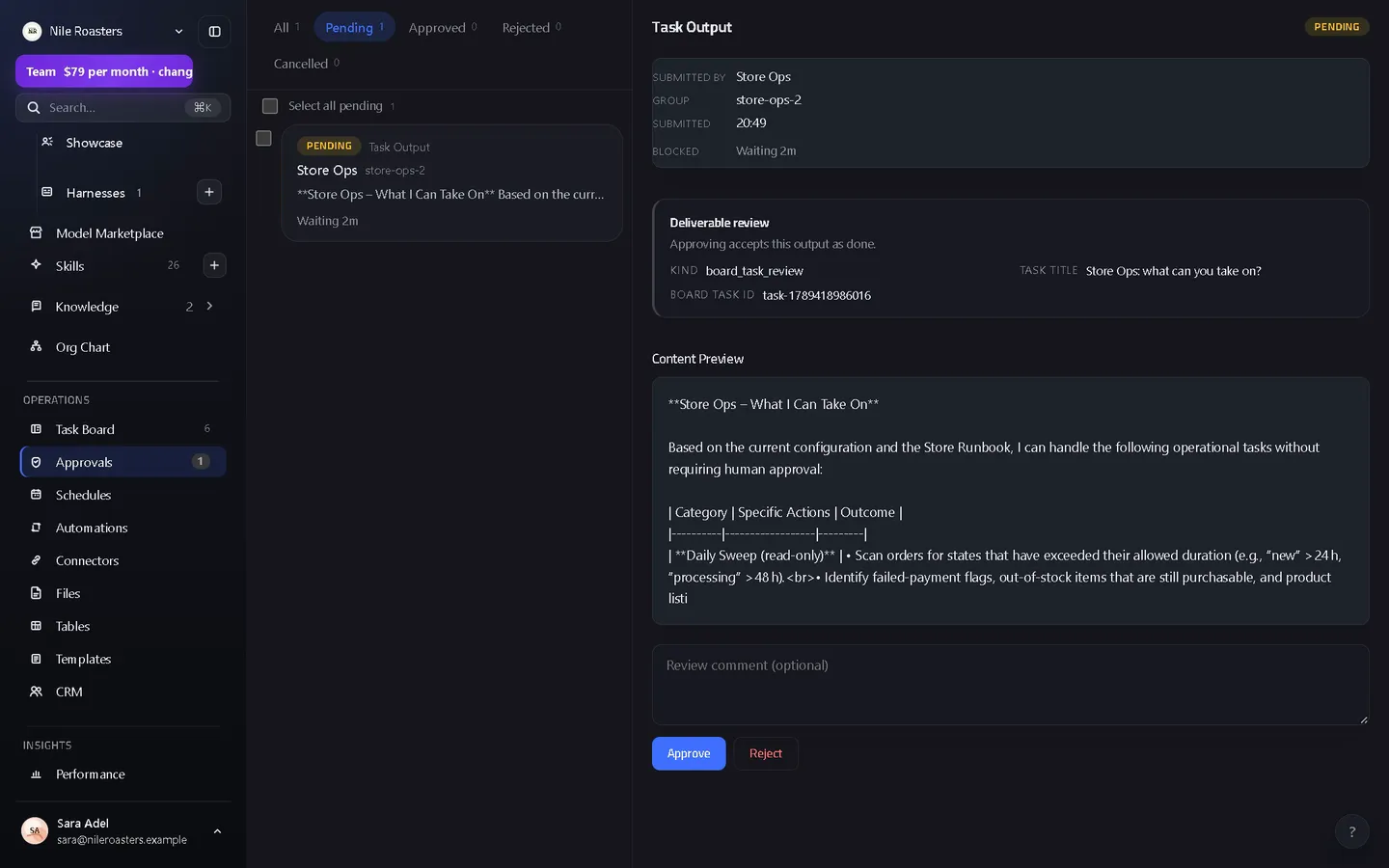
A connector write waits for a person unless an admin has set that connection to run without asking, and a delete always waits. Merges, knowledge changes and finished work from a reviewed-tier agent do stop for a human first: the agent posts what it intends to do, a workspace admin approves or rejects it with a comment, and the decision is written to a SHA-256 hash-chained audit log that reports the exact point at which it was tampered with.
How it works
The run reaches something it cannot decide alone
A tool call the agent’s brain asks permission for, a write to a connected app, a document update, a message about to be sent, a change to a knowledge page, a skill an agent wants to install. Eight approval types exist, and every one of them is raised by the code that would otherwise have gone ahead.
A request is created and everyone is told
The request names the agent, the channel, the source of the work and a preview of what it wants to do. Notifications go to the people who can decide, and a message is posted into the channel so it is visible where the work is.
A workspace admin approves or rejects, with a comment
Every path to a decision — the queue in the browser, an inline button in a connected chat app, a step inside a dev room — funnels through one review function, so no route can flip a status and skip the consequences.
The decision executes, it does not just record
Executors are registered per approval type and sub-kind and run inside the review. Approving a delivery marks the board task done; rejecting it puts the card back in progress so the agent can refine and resubmit.
The audit log takes the entry and links it to the last one
Each entry carries its sequence number, the previous entry’s hash and its own. Rewriting history means rewriting every hash after it, and a verification pass walks the chain and names the first sequence number that no longer computes.
What reaches the queue
Five different kinds of request land in one place, so “what is waiting on me” is one screen rather than five.
| Request | Raised when |
|---|---|
| Workspace approval | An agent’s task output, document update, message draft, tool permission request, connector write, knowledge proposal, skill import or model marketplace change needs a person to agree. |
| Channel access | An agent or a person asks to join a channel it is not a member of. |
| Document permission | An agent asks for a level of access to a specific document. |
| Agent access | Someone asks for access to an agent, or accepts an invitation to a fork of one. |
| Knowledge proposal | An agent proposes creating or updating a knowledge page, and names which agents it should apply to. |
The audit log underneath it
Sequenced and chained
Every entry has a sequence number, the previous entry’s hash and its own SHA-256 digest over the workspace, the sequence, the previous hash and the entry’s own contents.
Verifiable, not just claimed
A verification pass reads the chain in order, recomputes each digest and returns how many entries it checked and the first sequence number where the chain breaks — a result, not a reassurance.
Serialised on purpose
Appends take a workspace-scoped advisory lock with a bounded wait, so two concurrent writers cannot both claim the same sequence number and a lock left behind by a failed request surfaces as an error rather than a hang.
Idempotent appends
An event carrying an id that is already in the chain is skipped rather than duplicated, so a retried request does not fork the history it is meant to record.
What approvals deliberately do not do
- They do not cover everything. A connection an admin has set to run without asking writes with no request (a delete still waits); an agent on the trusted tier skips the finished-work review, and no agent can approve its own request.
- They are not a policy engine. You do not write rules like “allow refunds under $50”. A request waits for a person, a write to a connection set to refuse writes is refused, or the action was never gated in the first place.
- They are not multi-step sign-off. One admin decision resolves a request. There is no two-of-three approval, no escalation ladder and no delegation window.
- The chain proves tampering, not innocence. A hash chain tells you history was altered and where. It is not a signature from an outside party and it is not notarised anywhere off the deployment.
- Not every read is gated. The gate is on the actions that change something. An agent reading a connected app it was given access to does not raise a request each time.
Where approvals sit
The gate is what makes the rest of the product safe to leave running. The agents that raise these requests hold scoped access rather than your credentials, granted through connected apps with a per-connector write policy. Requests and decisions appear in the same inbox thread as the work, and an agent left running by a standing schedule gets no exemption: its connector writes follow the same per-connection policy, and its gated work still stops here.
See how the whole flow fits together, or what each plan includes. Approvals are part of every plan; nothing about the safety model is a paid upgrade. The reasoning behind which actions stop here is written up in how to design agent permissions and the approval gate.
Questions about approvals
Can approvals be switched off so agents run unattended?
Who is allowed to approve?
What exactly makes the audit log tamper-evident?
Does an approval do anything, or just change a status?
Where do approval requests show up?
See it doing your actual work
Open a demo workspace, connect one app, and give an agent a real job. No card, no sales call.
We reply to every message within one business day.