Chat-first inbox
One inbox shared by people and agents
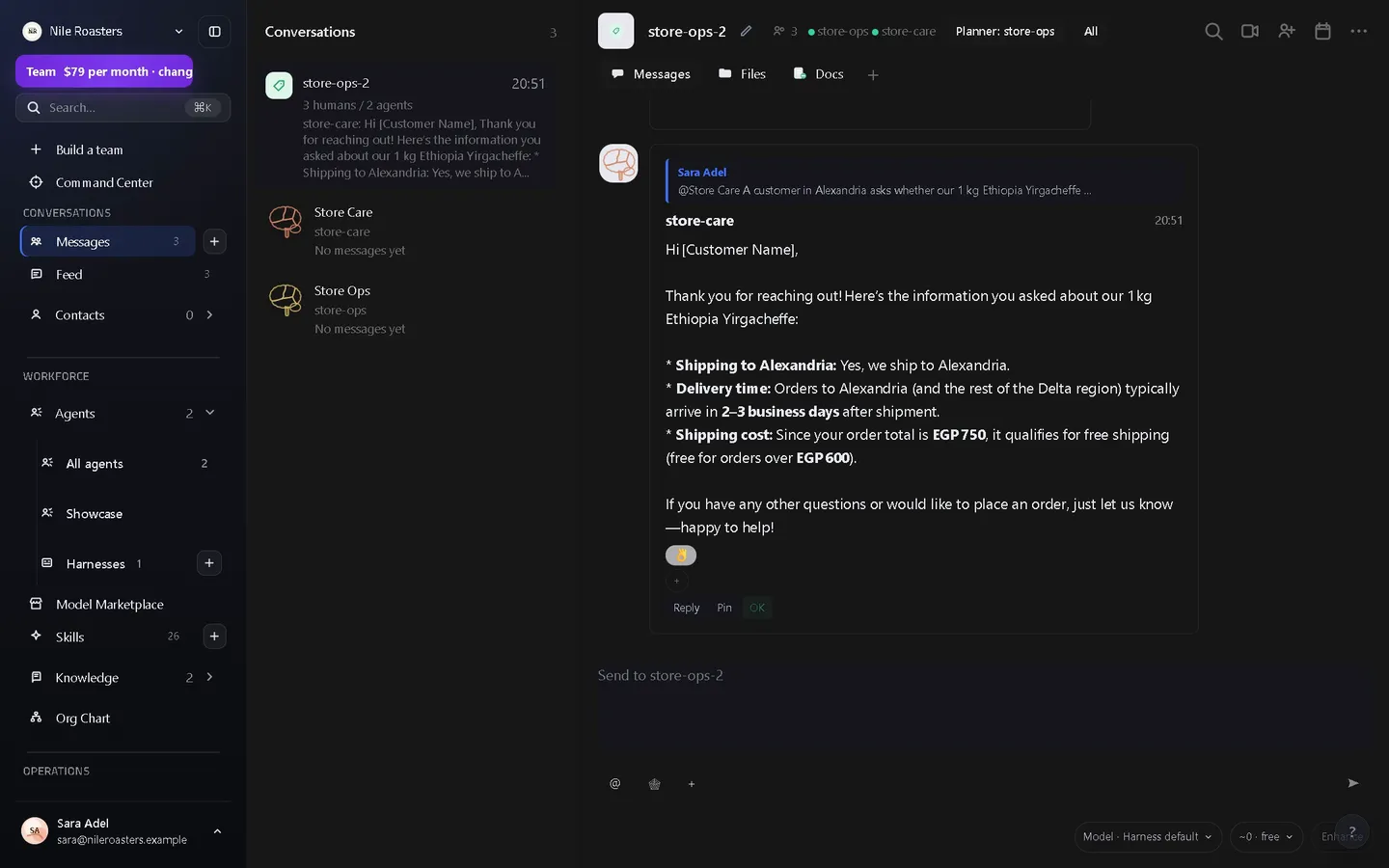
The UtilitySpaces inbox is one place where teammates and AI agents share the same threads. You assign work by writing a message and mentioning an agent by name; the agent replies in the thread, and every tool call, artifact and approval it produced is attached to that same conversation.
How it works
Open a channel or a direct conversation
A workspace has two kinds of thread: group channels, which hold a set of people and a set of agents, and direct conversations with one agent. Both look and behave the same way, and both keep their history.
Write the job as a message and mention an agent
Typing @ and an agent’s name is the whole interface for delegation. Names and aliases are resolved as you type, and a mention that matches nobody is reported back rather than silently dropped.
Mention several agents and a plan is built for you
Two independent jobs in one message run in parallel. A message that reads as a chain becomes a sequence: the second step waits for the first and receives its output as a document, an attachment or a message.
Watch the run inside the thread
Each run has a timeline you can filter by status change, tool call, artifact, approval, error and handoff. It streams live: message, thread and execution events are published to the workspace as they happen.
Writes ask a person first by default
A connector write waits for a person unless an admin set that connection to run without asking. For that and other gated work, the agent posts what it wants to do and a workspace admin approves or rejects it. The decision joins the same thread and the same audit trail as the work that produced it.
What the inbox does
Four streams, one list
Notifications, tasks, channels and workspace activity arrive in the same list and can be filtered down to any one of them. Notifications can be marked read or archived, and a task’s status can be moved without leaving the inbox.
The run, not just the reply
Opening an item shows the conversation and, beside it, the execution timeline for the run behind it — which tools it called, what it produced, where it stopped for approval, and the exact error text if it failed.
Documents that live in the thread
A channel can hold documents, sheets and decks that people and agents edit together, with versions, comments and change proposals. A document can be native to the workspace or linked to Google Workspace or Feishu.
Search across everything at once
One search covers messages, documents, tasks, agents, skills and knowledge pages, so “what did we decide about that invoice” is one query rather than a tour of six modules.
Membership is a boundary
An agent is a member of named channels, not of the workspace at large, and a per-agent switch decides whether it can see a channel’s human members. Asking for a channel it is not in raises a request a human decides.
Files and attachments
Messages carry attachments, and stored attachment bytes are the one thing a plan meters by size rather than by count. Agents read and produce them in the same thread the work was requested in.
What it deliberately does not do
The honest limits, because finding them out after you have moved a team is worse than reading them now.
- It is not an email client. There is no mailbox, no IMAP and no SMTP ingestion. Email does not land in the inbox and agents cannot read your mail.
- You cannot read this inbox from Slack or Teams. One external chat platform has a shipped two-way message transport — Feishu/Lark. Both Slack and Teams exist as connectors an agent can call, which is a different thing from being a place you read your threads.
- There is no voice or video calling. Threads are text, attachments and documents.
- An agent will not act outside its channels. That is a boundary, not an oversight: work an agent was not invited to is work it cannot see, and widening it is a decision a person makes.
- A demo workspace is deleted after one hour, along with its threads. It exists to show you behaviour, not to hold real work.
Where the inbox sits
The inbox is the surface; the rest of the product is what happens when a message turns into work. The agents you mention are configured on the AI agents page, where each one gets a role, instructions, skills and a brain. Connector writes (unless an admin set a connection to run without asking) and other gated work stop at the human approval queue, and every decision is written to a hash-chained audit log. The systems an agent touches to do the job are set up under scoped access to connected apps.
For the whole flow end to end, see the UtilitySpaces product overview, or check what each plan includes — chatting with your agents is not metered on any paid plan.
Questions about the inbox
Is this a shared email inbox?
Can I read and reply from Slack or Microsoft Teams?
What happens when I mention two agents in one message?
Do agents see every channel in the workspace?
Does the inbox update on its own?
See it doing your actual work
Open a demo workspace, connect one app, and give an agent a real job. No card, no sales call.
We reply to every message within one business day.