Cost tracking
What every agent run actually cost
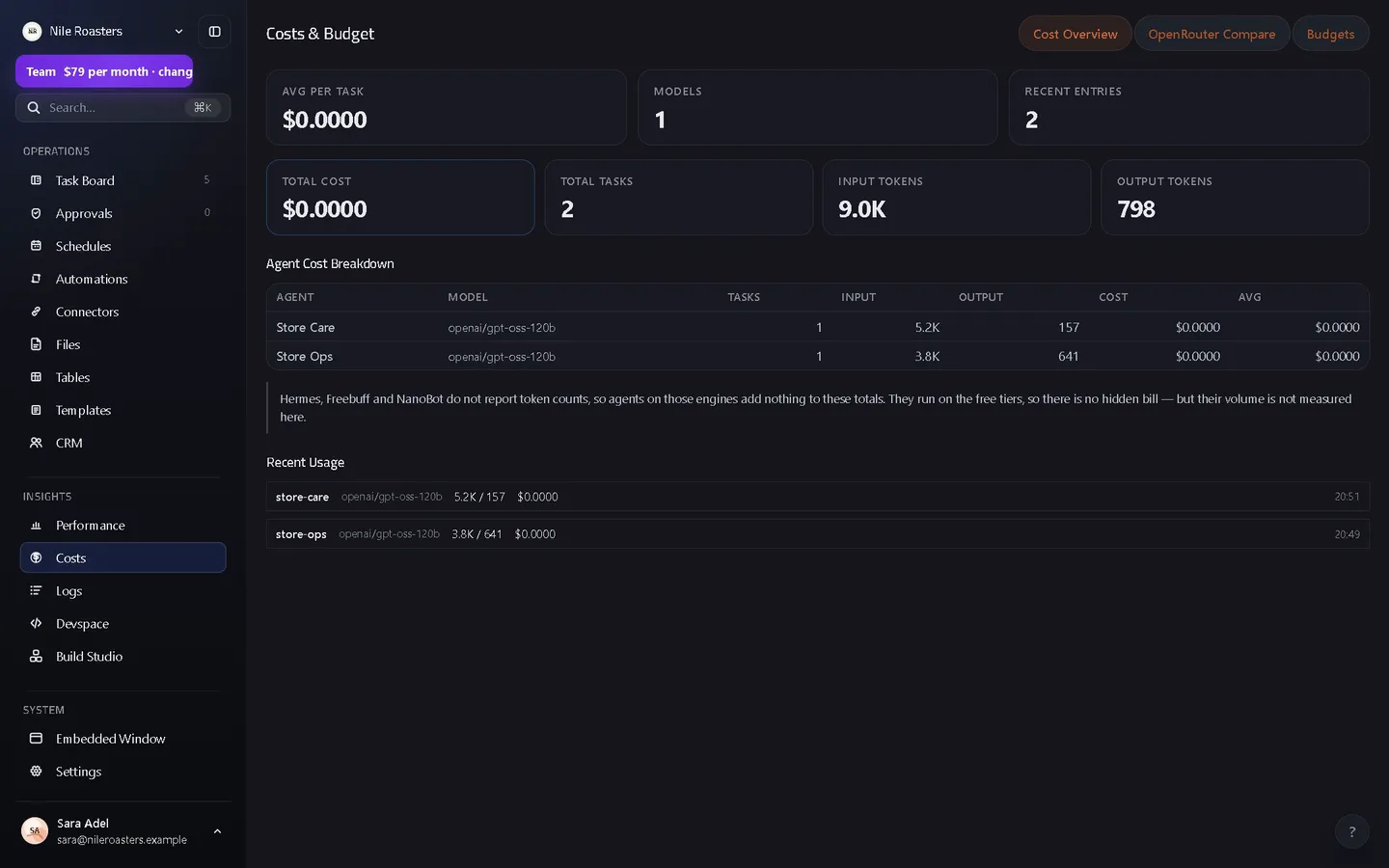
UtilitySpaces records the tokens and cost of every agent run against the agent, the model and the channel that produced it. A cost screen totals it per agent and per model, a comparison view reprices the same usage at live public market rates, and budgets can pause an agent that goes over.
How it works
Every run writes a usage row
Input and output tokens, cache reads and writes, reasoning tokens, web searches and image and audio units, plus the agent, the channel, the task and both the model you configured and the model the brain actually reported using.
The row is priced as it is written
Cost is computed at insert against the deployment’s rate card, which marks each model as priced, deliberately free, or not yet priced — three states, so “free” and “nobody knows” never look the same on a chart.
Read it by agent, by model, by channel, over time
Per agent and model: total tokens in and out, total cost, how many tasks and the average cost per task. Per channel, with direct messages as their own bucket. And a series at hourly, daily, weekly or monthly granularity over any window.
Compare it against live market rates
The comparison view pulls a public model price list (OpenRouter’s catalogue), caches it, and reprices your actual usage at those rates — input, output, cache, reasoning, web search and media dimensions, and long-context tiers where a model has them.
Set a budget where you want a hard stop
Scope a budget to the whole workspace, one agent or one channel, monthly or cumulative, with a warning threshold. A budget set to pause refuses the next task at the moment it would start and says so in the channel.
Two numbers, and why they are different
| Recorded cost | Comparison cost | |
|---|---|---|
| Where the rate comes from | A rate card stored in the deployment, hand-verified against vendor pricing pages and carrying the date it was checked. | A public model price list (OpenRouter’s catalogue), fetched over the internet and cached, refreshable on demand. |
| When it is calculated | At the moment the usage row is written, and then frozen. | Every time you open the view, over the usage you already have. |
| Who can change it | A workspace owner, who can also choose to recost history — a deployment-wide change that writes an audit event. | Nobody. You can correct which catalogue model one of your local models maps to, and reset it again. |
| What it is for | Knowing what your agents cost you. | Knowing what the same work would have cost somewhere else. |
The comparison view also reports its own coverage: the share of tokens it could price, how many models it could and could not price, which rate-card dimensions it had to skip, and any agent that completed work while recording no tokens at all. A gap that is reported is a gap you can act on; a gap that is silently rendered as zero is a lie.
Bring your own provider key
Your account, your rates
Store a key for a provider and its models become selectable for your agents. If you would rather not, our shared brain is there and no key is needed to start.
Encrypted and tenant-bound
AES-256-GCM, with your workspace id as additional authenticated data, so the stored blob cannot be decrypted under another workspace. Only the last four characters are ever shown back to you.
Verified over a guarded connection
The endpoint must be public HTTPS, and that is asserted when you save it and again on every probe rather than once and trusted. Redirects are refused outright, so a redirect cannot carry your authorisation header somewhere else.
Scrubbed from error text
Provider error messages are stripped of the key before they are truncated, not after — because a key straddling the cut would otherwise survive as a readable prefix.
What cost tracking deliberately does not do
- No CSV or spreadsheet export of cost data. The workspace log has an export; the cost screens do not. If you need the numbers elsewhere today, you are reading them off the screen.
- No per-person attribution. Usage carries an agent, a channel, a task and a model. There is no human user column, so “what did Sara spend” is only answerable if Sara has her own agents.
- Recorded cost is not a live vendor quote. It comes from a curated table with a verification date on it. When a vendor changes prices, someone has to update that table — and can then recost history on purpose.
- Budget warnings do not notify anyone. A warning threshold is computed and reported, but only the pause action is enforced. There is no budget alert email.
- It is not an invoice. These are your model costs. Your UtilitySpaces subscription is a separate, invoiced amount.
Where cost tracking sits
Every number here is produced by something else in the product. The agent that ran the job is the row it is charged to, and the channel the work happened in is the second dimension. Agents left running by a standing schedule are the ones worth watching, because they spend without being asked, and the connected apps they call are where that spend turns into an actual change to a real system — after a person approves it, unless an admin set that connection to run without asking, as the approvals page sets out.
See the product overview for the whole chain, or the pricing page for what the subscription itself costs.
Questions about cost tracking
Where do the prices come from?
Can I attribute cost to a person?
Can I use my own provider key instead of yours?
What does a budget actually do when it is exceeded?
How do I know the numbers are complete?
See it doing your actual work
Open a demo workspace, connect one app, and give an agent a real job. No card, no sales call.
We reply to every message within one business day.